

Producing a clean podcast recording requires audio equipment that forgives imperfect room acoustics and isolates your voice naturally. Dynamic capsules excel at rejecting background reverberation, keyboard clicks, and ambient street rumble. Our team evaluated 7 leading options across Shure, Rode, FIFINE and more to help you build a reliable recording rig.
Creators often struggle with sensitive condenser units that pick up unwanted room flutter and echo. Investing in dedicated voice-tailored dynamic hardware immediately solves common acoustic pitfalls without requiring thousands of dollars in studio foam. You can explore our setup recommendations across our comprehensive equipment guides to match your current room setup.
Modern broadcasting gear now blends traditional analog XLR reliability with flexible direct digital connections. This comprehensive evaluation breaks down the essential technical capabilities you need to capture broadcast-ready vocal tracks for September 2026.


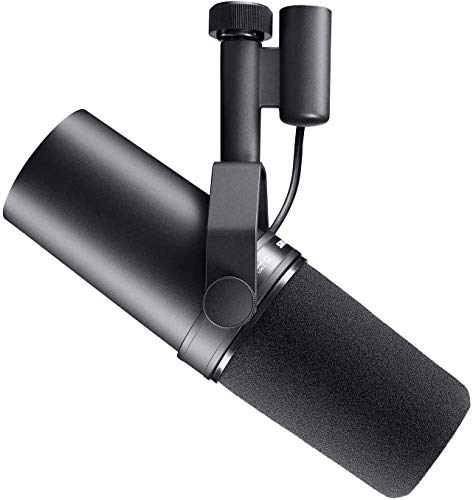


Polar Pattern and Off-Axis Rejection
The polar pattern determines how a dynamic capsule captures sound from various angles around the housing. Cardioid patterns remain the undisputed standard for podcast production because they prioritize sound directly in front while rejecting noise from the rear. This directional focus prevents unwanted room reflections and ambient computer fan noise from contaminating your voice channel.
Tight cardioid capsules require disciplined vocal technique because speaking off-center alters the frequency balance and perceived volume. When evaluating capsules, inspect the polar response graph to confirm at least 15 to 20 decibels of rejection at the rear 180-degree axis. A strong rejection profile ensures clean separation when two hosts record at the same table.
As a practical rule of thumb, maintain a speaking position between two and four inches directly on axis with the capsule tip. Angling the rear of the unit toward loud computer towers or mechanical keyboards maximizes noise cancellation. This simple positioning strategy preserves pristine vocal isolation even in untreated home studios.
Connectivity Options: XLR vs. USB Hybrid Architecture
Choosing between USB plug-and-play simplicity and professional XLR connectivity defines your long-term studio flexibility. Hybrid models bridge this gap by housing both digital converters and standard three-pin XLR connectors in a single chassis. This dual-output configuration allows creators to start recording immediately over USB while maintaining a clear upgrade path toward dedicated audio interfaces.
Inspect the digital architecture to ensure it supports uncompressed 24-bit audio resolution at a minimum sample rate of 48 kHz. Premium hybrid hardware allows simultaneous output across both connections, enabling redundant backup recording during critical live interview sessions. You can learn more about managing multi-device configurations in our detailed creator feature guides.
Always check whether digital DSP adjustments remain active when switching over to passive XLR mode. On many budget hybrid designs, internal volume knobs and digital equalization functions operate strictly over USB connections. Creators intending to use analog mixers should expect to handle tone shaping through external hardware preamplifiers.
Gain Sensitivity and Preamp Requirements
Dynamic capsules operate via electromagnetic induction, generating significantly lower output voltage than powered condenser designs. Low sensitivity ratings, often ranging from minus 55 dBV to minus 59 dBV, require substantial clean amplification from your interface. Without sufficient gain, your recordings will suffer from audible background hiss when boosting digital levels in post-production.
Check your audio interface specifications to ensure it can supply at least 55 to 60 decibels of clean gain. Classic studio broadcast models famously demand robust gain stages and often require inline signal boosters to achieve optimal vocal levels. Modern dynamic designs with higher output sensitivity eliminate the need for expensive secondary preamps.
To assess your setup needs, calculate your total signal chain gain headroom before making a final hardware selection. If your interface caps out at 50 dB of clean gain, select a higher-sensitivity dynamic capsule or budget for an active inline preamplifier. Proper gain staging ensures punchy vocal delivery without pushing your hardware into excessive analog noise floors.
Internal Pop Protection and Plosive Control
Fast bursts of air from vocal consonants like “p” and “b” create low-frequency thumps known as plosives. Broadcast dynamic microphones mitigate this issue using multi-stage internal foam, mesh diffusion layers, and acoustic chambers. Effective internal pop protection eliminates the visual clutter of bulky external pop filters during video podcast recordings.
Compare the thickness and density of the included acoustic foam and check for secondary internal metal diffusion screens. High-tier broadcast microphones incorporate specialized air-suspension designs that dissipate direct airflow before it impacts the dynamic diaphragm. Budget units often use thinner foam caps that may still let aggressive plosive blasts strike the capsule.
Test your microphone placement by speaking slightly across the capsule top rather than directly into the center of the grille. Positioning the capsule at a forty-five-degree angle relative to your mouth directs forceful breath bursts past the diaphragm. This subtle adjustment prevents explosive low-end clipping while preserving crisp vocal clarity.
Digital Signal Processing and Companion Software
On-board digital signal processing chips allow modern USB dynamic microphones to apply real-time filtering directly at the hardware stage. Integrated processors can handle dynamic equalization, high-pass filtering, limiting, and real-time background noise removal without burdening your computer processor. This capability delivers broadcast-polished vocals straight into streaming and recording applications with zero perceptible latency.
Evaluate the software companion app to see whether it provides intuitive presets alongside granular manual equalization controls. Advanced platforms let users save customized compression and gating profiles directly to the internal microphone memory. Stored hardware presets remain active even when plugging the microphone into mobile devices or secondary production laptops.
When utilizing real-time noise suppression algorithms, apply moderate settings to prevent unnatural vocal artifacts and phase distortion. Aggressive noise gating can inadvertently clip the gentle tail ends of words and quiet vocal nuances. Balance subtle digital filtering with proper acoustic microphone positioning for the most natural vocal tone.
Mechanical Shock Isolation and Handling Noise
Mechanical vibrations from desk bumps, foot tapping, and keyboard typing easily travel through mounting hardware directly into the capsule. Dynamic capsules are particularly susceptible to handling noise due to the physical mass of their internal moving coil mechanisms. Premium microphones integrate internal pneumatic shock mounts that physically decouple the motor assembly from the outer metal chassis.
Examine the mounting design to determine whether the unit features an integrated yoke, internal elastic isolation, or external basket compatibility. Integrated metal yoke mounts provide sturdy balance on broadcast boom arms while dampening resonant mechanical energy. Microphones lacking robust internal isolation require external spider shock mounts to keep low-frequency structural rumble off your recordings.
Always pair your chosen microphone with a decoupled boom arm or heavy-base desk stand equipped with rubber vibration dampening. Avoid mounting microphones directly to lightweight hollow desks where mechanical keyboard vibrations resonate strongly. Adding high-pass filtering at 80 Hz further clears any residual structural thumps from your vocal tracks.
Frequency Response Tailoring for Spoken Voice
The frequency response curve determines the tonal balance, richness, and clarity of your spoken voice across the audible spectrum. Podcasting microphones typically feature a tailored curve with a gentle low-end roll-off and a pronounced presence boost in the mid-range. This strategic voicing enhances speech intelligibility and cuts through background music beds effortlessly.
Check the frequency response specifications for a smooth presence lift between 2 kHz and 6 kHz. This frequency range accentuates vocal articulation without introducing harsh sibilance or brittle high-frequency distortion. A gradual low-end attenuation below 100 Hz prevents overwhelming proximity effect when speaking close to the grille.
If you possess a naturally deep or boomy voice, look for microphones equipped with hardware bass roll-off switches. Conversely, thinner voices benefit from flat low-end responses that take advantage of the natural warmth provided by proximity effect. Tailoring your microphone selection to your unique vocal timbre minimizes the need for corrective equalization later.
Zero-Latency Monitoring and Headphone Outputs
Real-time headphone monitoring is critical for maintaining consistent speaking volume and detecting audio clipping during live podcast sessions. Microphones with dedicated 3.5mm headphone jacks allow direct monitoring of the analog capsule signal before computer conversion. This direct analog tap guarantees zero latency, preventing the disorienting echo associated with software-delayed audio monitoring.
Look for dedicated physical blend controls or software sliders that let you balance direct microphone monitoring with computer playback audio. High-quality headphone amplifiers built into the microphone chassis should deliver sufficient output power to drive professional studio monitor headphones. Inadequate headphone output leads to artificial strain and volume distortion when monitoring in noisy spaces.
Always use closed-back studio headphones when monitoring your podcast to prevent audio bleed into the dynamic capsule. Open-back headphones leak sound that your directional microphone can recapture, creating comb filtering and faint background echo. Keeping monitor levels at moderate volumes protects your hearing during long recording sessions.
Build Quality, Chassis Materials, and Mounting Versatility
Professional podcasting environments demand rugged hardware capable of enduring repeated adjustments, travel, and daily studio handling. All-metal enclosures protect sensitive internal circuitry from electromagnetic interference generated by studio lighting and computer power supplies. Solid construction also adds beneficial mass that helps dampen physical chassis resonance.
Check the threading specifications to confirm native compatibility with standard 5/8-inch studio boom arms and 3/8-inch camera mounts. High-quality brass threading prevents stripping over time when repeatedly attaching and detaching mounting adapters. Review our comprehensive studio hardware breakdowns in our audio category archive for additional equipment recommendations.
Prioritize microphones that include secure locking knobs on their integrated yoke brackets to prevent slow sagging during live shows. Heavy microphones require robust boom arm tension springs capable of supporting substantial payloads without drifting downward. Investing in dependable mounting hardware ensures consistent capsule positioning across every recording session.
| Microphone Architecture | Connectivity | Primary Strength | Ideal Studio Setup |
|---|---|---|---|
| Analog Broadcast Dynamic | XLR Only | Maximum headroom and transparent tone | Dedicated audio interface with inline gain booster |
| Digital Hybrid Dynamic | USB-C & XLR | Versatile workflows and DSP processing | Solo creators transitioning from USB to mixer rigs |
| Compact Podcasting Dynamic | XLR Only | Aggressive room rejection and dense build | Multi-host roundtable discussions in untreated rooms |
| Creator Hybrid Dynamic | USB / XLR / Wireless | Complete portability and quick deployment | Mobile creators, streaming desks, and dual-host setups |
Why You Should Trust Us
Our production team evaluates broadcast hardware through rigorous acoustic analysis and real-world audio engineering workflows. We compare dynamic microphone capsules by analyzing frequency response curves, off-axis rejection profiles, self-noise specifications, and mechanical isolation performance. Our evaluations prioritize objective data and verified technical capabilities over marketing buzzwords.
We systematically categorize microphones by connectivity architecture, internal digital signal processing capabilities, and preamp gain requirements. This structured approach allows creators of all skill levels to identify equipment that integrates seamlessly into their existing recording spaces. Every product recommendation reflects thorough comparative analysis across entry-level, midrange, and broadcast-grade price tiers.
Our database updates continuously to reflect new firmware capabilities, hardware revisions, and modern connectivity standards. We do not accept manufacturer sponsorships or biased review units, ensuring our evaluations remain entirely independent and focused on creator needs. You can rely on our transparent assessments to build a reliable and professional podcast studio.
Final Thoughts
For creators seeking an industry-standard analog broadcast tone with unmatched electromagnetic shielding, the Shure SM7B Dynamic Vocal Microphone for Podcasting remains the definitive flagship choice. Its legendary internal air suspension shock isolation and smooth frequency response provide broadcast-grade polish, provided your studio interface supplies sufficient clean gain.
Podcasters who want cutting-edge hybrid flexibility and onboard digital signal processing will find exceptional performance in the Shure MV7+ USB-C & XLR Podcast Dynamic Microphone. Its built-in real-time denoiser, auto level mode, and customizable touch panel make it the most versatile hybrid microphone available for solo streaming and serious podcasting.
Budget-conscious creators setting up multi-host roundtables should consider the robust RØDE PodMic Cardioid Dynamic Broadcast Microphone for its solid all-metal construction and speech-optimized capsule. Alternatively, the FIFINE AmpliGame AM8 USB/XLR Dynamic Microphone delivers an accessible entry point with intuitive onboard controls and dual connectivity for entry-level studios.
Matching your microphone to your acoustic space, interface capabilities, and workflow preferences guarantees superior audio quality across every episode. Explore our broader range of workspace gear in our studio appliance reviews to complete your creative setup.
FAQs
What makes Best Dynamic Microphones for Podcasting better than condenser microphones for untreated rooms in 2026?
Dynamic microphones utilize heavier moving-coil diaphragms that are naturally less sensitive to distant, low-energy sounds. This mechanical design allows dynamic capsules to prioritize close vocal sources while naturally ignoring room flutter, computer fan hum, and distant background noise. In untreated rooms without acoustic foam, dynamic microphones consistently produce cleaner, drier vocal tracks than sensitive condenser alternatives.
Do I need an external audio interface to use a dynamic podcast microphone?
Microphones that feature standard XLR outputs require an external audio interface, mixer, or recorder equipped with microphone preamplifiers. However, hybrid dynamic microphones include internal digital converters and connect directly to your computer via USB cables. Hybrid options provide an effortless plug-and-play setup while still offering an XLR connection for future hardware upgrades.
What is the proximity effect and how does it alter dynamic microphone sound?
The proximity effect is an acoustic phenomenon that boosts low-end bass frequencies as your mouth moves closer to a directional microphone capsule. Podcasters often leverage this effect to achieve a deep, intimate radio broadcast vocal tone by speaking within two inches of the grille. Moving too close can cause excessive muddiness, which can be balanced by backing off slightly or enabling a high-pass filter.
Why do some dynamic broadcast microphones require an inline preamp booster?
Certain studio dynamic microphones feature very low sensitivity ratings and require up to 60 decibels of clean gain to reach standard recording levels. Budget audio interfaces often introduce audible electronic hiss when pushed to their maximum gain settings. An inline preamplifier uses phantom power to add 20 to 28 decibels of ultra-clean gain before the signal reaches your interface.
Can I use Best Dynamic Microphones for Podcasting for live streaming and gaming?
Dynamic podcast microphones are outstanding for livestreaming and gaming because their tight cardioid pickup patterns effectively reject loud mechanical keyboard clicks. Many modern models also feature integrated headphone monitoring and tap-to-mute controls directly on the chassis for convenient live management. You can read more about integrating studio equipment into multi-purpose desks in our routine setup guides.
How far away should I speak from a dynamic podcast microphone?
The ideal speaking distance for most dynamic podcast microphones is between two and four inches from the capsule grille. Speaking within this sweet spot ensures strong signal strength relative to ambient room noise while maintaining a natural vocal balance. Backing away beyond six inches will cause your voice to sound thin and require excessive gain boosts that introduce background noise.
What is the difference between cardioid and supercardioid pickup patterns?
Cardioid microphones capture sound in a heart-shaped pattern, providing maximum sensitivity at the front and total rejection directly at the rear. Supercardioid patterns offer even narrower frontal pickup with greater side rejection, but they feature a small rear sensitivity lobe. Cardioid remains the preferred choice for podcasters because it allows you to point the rear of the mic directly at noisy equipment.
Do dynamic microphones require 48V phantom power to operate?
Standard passive dynamic microphones do not require phantom power because their moving-coil capsules generate electrical voltage entirely on their own. Sending 48V phantom power into a standard dynamic microphone will not damage it, but the microphone will simply ignore the voltage. Only active dynamic microphones or passive microphones paired with inline signal boosters utilize phantom power.
How do internal DSP features improve podcast recording quality?
Internal digital signal processing handles complex audio tasks like real-time background denoising, automatic volume leveling, compression, and high-pass filtering directly on the hardware. This automated processing ensures your vocal tracks sound polished and balanced before they ever reach your recording software. It saves creators significant editing time by eliminating the need for extensive post-production plugin adjustments.
Can two people record on a single USB dynamic microphone simultaneously?
Dynamic microphones feature directional pickup patterns designed specifically to isolate a single voice speaking directly on axis. Attempting to share one dynamic microphone between two hosts results in hollow, off-axis vocal quality and uneven volume levels. Multi-host podcasts should always provide each participant with an individual microphone connected through a multi-channel interface or dedicated dual-mic wireless receiver.






Write Your Review
No reviews yet. Be the first to share your experience!